Documentation / Knowledge Base
DNS names not resolving through Enclave Gateway on macOS
When a macOS system is connected to an Enclave Gateway, DNS names that depend on internal nameservers reachable through the Gateway may fail to resolve - even though the same names resolve correctly on Windows and Linux. The Gateway can forward the query to those nameservers and return the answer, but macOS never delivers the query to the local Enclave stub resolver, so it never reaches the Gateway.
This article explains why this happens and describes two approaches to resolve the issue.
Symptoms
A user on macOS is connected to an Enclave Gateway that provides access to a remote network. DNS names for devices on that network do not resolve, even though:
- The same names resolve correctly from Windows or Linux systems connected to the same Gateway.
- The Enclave Gateway is correctly configured and can resolve the names when queried directly.
- Other Enclave functionality (e.g.
.enclavenames, direct IP connectivity through the Gateway) works as expected.
For example, attempting to resolve db1.corp.trantor.example (a name that can only be resolved by an internal nameserver reachable through the Gateway) fails, but resolving .enclave names works normally.
Cause
macOS uses a concept called match domains (also known as supplemental match domains) to decide which DNS resolver receives which queries. Rather than sending all DNS queries to every configured resolver, macOS routes each query to the resolver whose match domains include the queried domain.
When Enclave starts, it registers .enclave as a match domain to its local stub resolver. You can see this by running scutil --dns and looking for the Enclave resolver entry:
$ scutil --dns
...
resolver #N
  nameserver[0] : 100.64.1.10
  domain   : enclave
  flags    : Scoped
...
This means macOS routes queries for names ending in .enclave to the Enclave stub resolver - but queries for any other domain (such as corp.trantor.example) are sent to the system's default resolver instead, bypassing Enclave entirely.
The Enclave stub resolver would answer these queries correctly if it received them - it would forward them to the connected Gateway, which would, in turn, resolve them against its local network. But because macOS never delivers the query to the local stub resolver, the resolution fails.
This is different from Windows and Linux, where the Enclave stub resolver is typically consulted for all DNS queries and responds with SRVFAIL for names it cannot answer, allowing the operating system to gracefully fall back to other resolvers when the Enclave resolver cannot provide an answer.
Resolution
There are two ways to ensure macOS routes these DNS queries to the Enclave stub resolver. Where possible, we recommend Option 1.
Option 1: Create a DNS zone in the Portal
This is the recommended approach. By creating a DNS zone in the Enclave Portal with a record that resolves to the Gateway, the Enclave agent automatically registers that domain as a match domain on macOS. No local configuration is required on the client.
-
In the Enclave Portal, navigate to DNS and create a new zone for the domain you need to resolve (e.g.
corp.trantor.example). -
Add a DNS record in the zone that resolves to the Gateway, or set of gateways, through which the internal nameservers are reachable. The record can be an apex record (
@) or any name you choose. In the example below, a.xyzzone is created with an apex record pointing to a single Gateway system (5L9VV) selected from the Systems dropdown under Targets.Why this works
When a DNS zone contains a record that resolves to a Gateway, the Enclave agent on each connected client learns about the zone and registers it as a match domain with the operating system. On macOS, this is what causes the OS to route queries for that domain to the Enclave stub resolver.
The zone name should match the domain you need to resolve - this could be
corp.trantor.example,trantor.example, or any other domain whose names are served by internal nameservers behind the Gateway.We suggest using an apex record (
@) because it creates a valid DNS entry at the zone root without introducing a fabricated hostname into the zone. Any record type would trigger the match domain registration, but an apex record is the cleanest choice - it doesn't pollute the zone with an arbitrary name that might be confused for a real host. If the apex record is already in use or you prefer not to modify it, you can use any other name (e.g.dummy) instead.You can target the Gateway (or gateways) selecting from Systems, or Tags. Using a tag can be easier to maintain if you have multiple gateways, but care should be taken to ensure the tag is only applied to the relevant Gateway systems, and never applied to regular endpoints - which could cause confusion.
The macOS client must have a policy connecting it to the Gateway system targeted by the DNS record, and if the policy has trust requirements they must be met and the tunnel established before the resolver configuration takes effect.
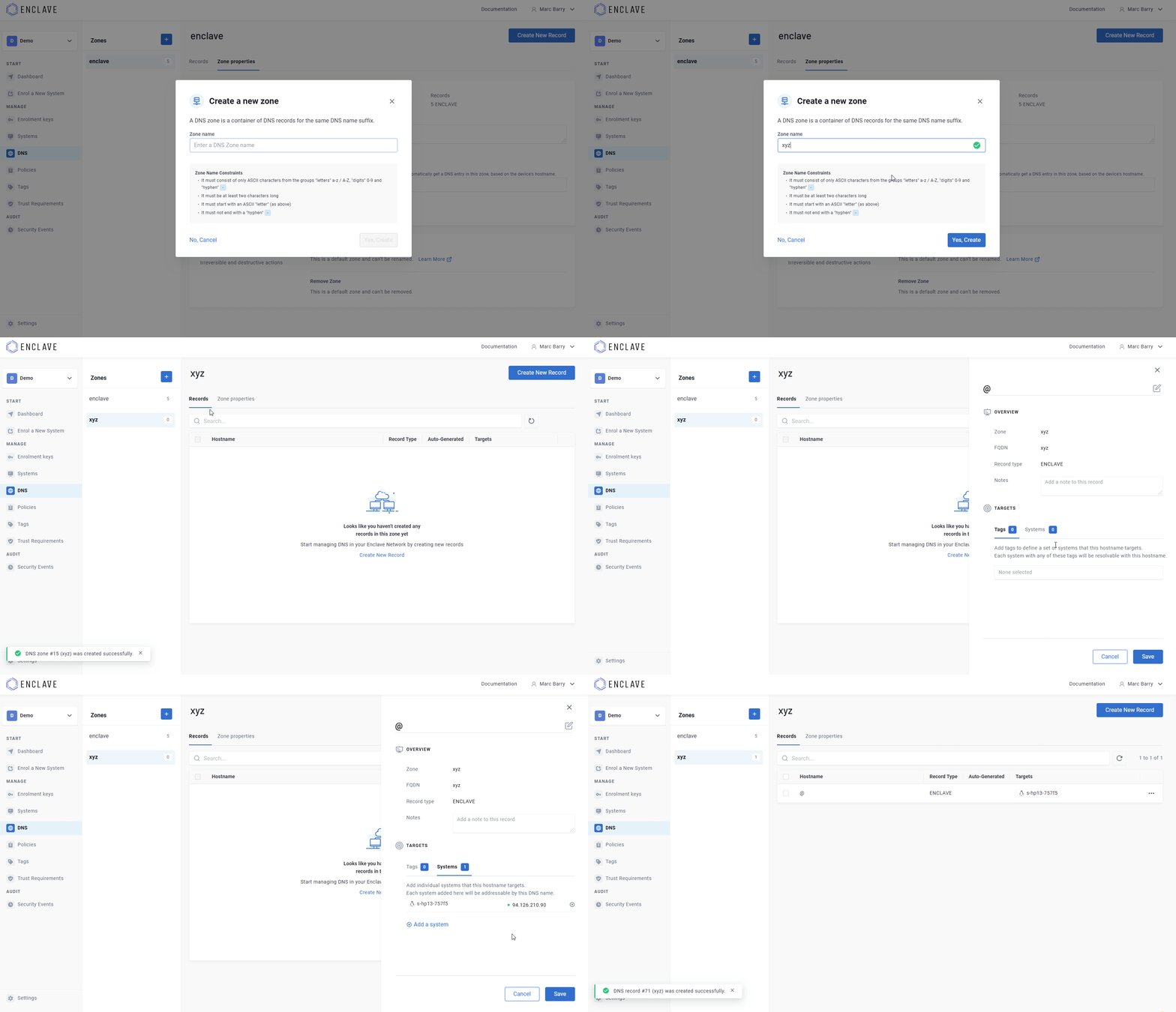
-
On the macOS client, verify that the domain now appears in the resolver configuration:
scutil --dnsYou should see an entry for your zone's domain pointing to the Enclave stub resolver's IP address.
-
Test name resolution for a hostname in that domain.
Option 2: Create local resolver files
If you prefer not to create a DNS zone in the Portal, or need a solution that doesn't depend on Portal configuration, you can manually configure macOS to route queries for specific domains to the Enclave stub resolver.
macOS supports per-domain resolver configuration through files in /etc/resolver/. Each file is named after a domain and specifies which nameserver should handle queries for that domain.
-
Create the resolver directory if it doesn't already exist:
sudo mkdir -p /etc/resolver -
Get the local Enclave IP address:
enclave get-ipNote
If Enclave is enrolled to more than one organisation on this system, specify the appropriate profile name (e.g.
enclave get-ip --profile Universe). -
Create a resolver file for each domain you need to resolve through the Gateway. Substitute your Enclave IP address and domain as appropriate:
export ENCLAVE_IP=$(enclave get-ip) sudo sh -c "echo 'nameserver $ENCLAVE_IP' > /etc/resolver/example.com" sudo sh -c "echo 'nameserver $ENCLAVE_IP' > /etc/resolver/example.org" -
Verify the configuration:
scutil --dnsYou should see resolver entries for each domain you configured, pointing to the Enclave stub resolver.
-
Test name resolution for a hostname in one of the configured domains.
Warning
Resolver files in
/etc/resolver/persist across Enclave restarts and reboots. If you later remove Enclave or change your Enclave IP address, remember to clean up these files - otherwise DNS queries for the configured domains will be sent to an address that no longer has a resolver listening.
Choosing an approach
| Portal DNS zone (Option 1) | Local resolver files (Option 2) | |
|---|---|---|
| Configuration | Centralised in the Portal | Per-machine, manual |
| Client setup | None required | Create /etc/resolver/ files on each Mac |
| Cleanup | Automatic when zone is removed | Manual - must delete files |
| Multiple Macs | Works for all clients automatically | Must be repeated on each machine |
| Scope | Entire domain | Can target specific subdomains |
For most deployments, Option 1 is preferred because it requires no client-side configuration and is managed centrally.
Option 2 is better when you only need some names within a domain to resolve through the Gateway. Creating a Portal zone for example.com causes macOS to route all queries for *.example.com through the Enclave stub resolver and Gateway - including names that would otherwise resolve fine via public DNS. With /etc/resolver/ files, you can be more granular. For example, creating /etc/resolver/internal.example.com routes only that subdomain through the Gateway while leaving the rest of example.com to resolve normally.
Having problems? Contact us at support@enclave.io or visit our support options.
Last updated April 30, 2026